 Thales | Security for What Matters Most
More About This Author >
Thales | Security for What Matters Most
More About This Author >
Thales | Security for What Matters Most
More About This Author >
Thales | Security for What Matters Most
More About This Author >
Password-based security is no match for modern digital infrastructure. With today’s sophisticated phishing attacks and credential theft, passwords simply aren’t enough. Yet, many organizations still rely on static credentials, which leaves key systems vulnerable to exploitation.
A technology addressing this challenge is Fast Identity Online 2 (more commonly called FIDO2), an open authentication standard for passwordless authentication that was created by a collaboration of the FIDO Alliance and the World Wide Web Consortium (W3C). FIDO2 enables users to securely log into online services using local authenticators such as biometric scanners and security keys without needing a password.
Key Takeaways
Here are a few highlights of what you’ll learn in this guide:
- FIDO2 is a phishing-resistant, passwordless, open authentication standard focused on increasing identity security.
- Passkeys are FIDO2 authentication credentials that use cryptography to access apps and websites instead of passwords.
- FIDO2 authentication uses a passkey, which includes a private and public key pair, to confirm your identity with a service provider.
- FIDO2 authentication provides stronger security, enhanced privacy, and a frictionless user experience than passwords, among other benefits.
- Numerous industries, including high-risk sectors such as banking, eCommerce and insurance, employ FIDO2.
What's the Difference Between FIDO, FIDO2, and Passkeys?
While FIDO 1.0 (or simply FIDO), FIDO2, and passkeys are closely related, they represent distinct stages and aspects of passwordless standards. In short, FIDO established early second-factor authentication after entering a password, FIDO2 evolved this into a universal passwordless framework, and passkeys serve as an implementation method of FIDO2 technology.
Here’s a brief comparison table that showcases the distinctions between these technologies.
| Attribute | FIDO | FIDO2 |
| Key protocols | UAF, U2F | WebAuthn, CTAP2 |
| Launch year | 2014 | 2018 |
| Primary focus | Second-factor authentication | Fully passwordless access |
| Device & platform support | Limited native OS support; required specific extensions or dedicated external security keys (hardware) | Native support across platform authenticators (smartphones, Windows Hello, Touch ID/FaceID) and major web browsers and OSs (Windows, Linux, macOS, Android, iOS) |
FIDO 1.0 Protocols
FIDO established two pioneering protocols in 2014: Universal 2nd Factor (U2F) reinforced passwords with physical hardware tokens for solid two-factor authentication (2FA), while Universal Authentication Framework (UAF) enabled biometric passwordless logins. Together, they evidenced a way forward to replace static credentials with safer public-key cryptography.
FIDO 2.0 Protocols
FIDO2 expands on FIDO 1.0 by combining two open standards into a single framework: Web Authentication API (WebAuthn) for browsers and Client to Authenticator Protocol 2 (CTAP2) for external authenticators like smartphones or FIDO security keys. Together, these standards allow users to log in securely without passwords across any platform or device.
What is a Passkey?
A passkey is the digital credential created through FIDO2 authentication. It enables you to log in to an app or website securely without entering a password. While people often use “passkey” and “FIDO2” interchangeably, FIDO2 is the underlying technical standard of a passkey.
The History of FIDO2
In 2013, tech leaders founded the FIDO Alliance to “define an open, interoperable set of mechanisms that reduce the reliance on passwords,” as Dr. Rolf Lindemann, one of the authors of the original passwordless FIDO specification, describes in his formative paper, The Evolution of Authentication.
By 2014, the alliance launched its FIDO 1.0 specifications, introducing the world to UAF and U2F. These early protocols evidenced that public-key cryptography could successfully replace static credentials.
In 2018, FIDO2 emerged through collaboration with the W3C, introducing the WebAuthn and CTAP2 standards. This milestone brought native passwordless capabilities directly into major web browsers and operating systems.
In 2022, the FIDO Alliance introduced multi-device, synced passkeys alongside major platform providers. This expansion allowed cryptographic credentials to back up and synchronise easily across a user's devices, driving consumer adoption to the point of mass proliferation.
In fact, the number of passkeys in active use surpassed five billion in 2026, with 90% of consumers being familiar with the technology and 75% having it enabled on at least some accounts.
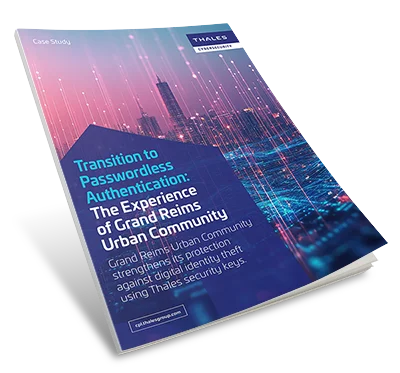
How Grand Reims Transitioned to Passwordless Authentication
Learn how Grand Reims deployed FIDO-based passwordless authentication with Thales security keys to prevent phishing and secure hybrid environments.
How Does FIDO2 Authentication Work?
When you register an account, your device generates a unique pair of cryptographic keys: a private key and a public key. Together, these keys comprise the passkey. The private key stays locked safely inside your device's secure hardware and never touches the network, while the public key is sent to the service provider (the “relying party”) for storage.
During sign-in, the service issues a unique cryptographic challenge that your device signs using its previously generated private key after verifying your identity locally. The service verifies this signature against the stored public key to grant access, ensuring attackers can’t intercept your credentials while completing the FIDO2 authentication process.
Step-by-Step: Registering and Authenticating with a Passkey
Here’s a high-level walkthrough of how you can accomplish FIDO2 authentication with a passkey:
- Initiate registration: You choose to register a passkey inside the application or service portal.
- Verify local identity: Your device prompts you to verify your identity using a biometric method (e.g., fingerprint, face scan) or device PIN.
- Generate a unique key pair: Your device creates a cryptographic public key and private key.
- Store the public key: The device sends the public key to the service provider while keeping the private key safely locked in local hardware.
- Initiate sign-in: When returning to log in, you enter your username or select the passkey sign-in option.
- Cryptographic challenge: The service provider sends a unique, temporary cryptographic challenge back to your device.
- Unlock private key: Like in the earlier step, you verify your identity locally with biometrics or a PIN to allow access to your device’s private key.
- Sign and verify: Your device signs the challenge with the private key, and the service provider verifies this signature using the previously stored public key to complete sign-in and grant you access to the service.
Passkeys and FIDO2 Authenticator Types
To meet distinct security needs, FIDO2 authenticators differ in how credentials are stored, backed up, and accessed across devices.
Device-Bound vs. Synced Passkeys
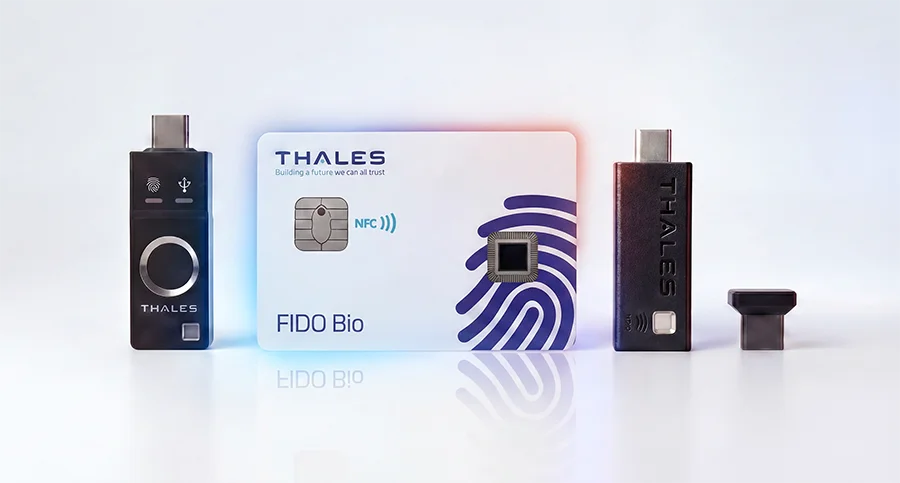
Device-bound passkeys, as the name suggests, store private keys exclusively on a single physical device—the keys are bound to a specific smartphone, laptop, etc. This approach offers maximum protection against credential extraction, which is especially valuable for security-conscious enterprises and government agencies.
In contrast, synced passkeys aren’t bound to a single device; their credentials can be securely duplicated across a user’s personal device ecosystem through cloud keychain services. Though not as isolated as its physical counterpart, a synced passkey does offer greater convenience while remaining more secure than passwords.
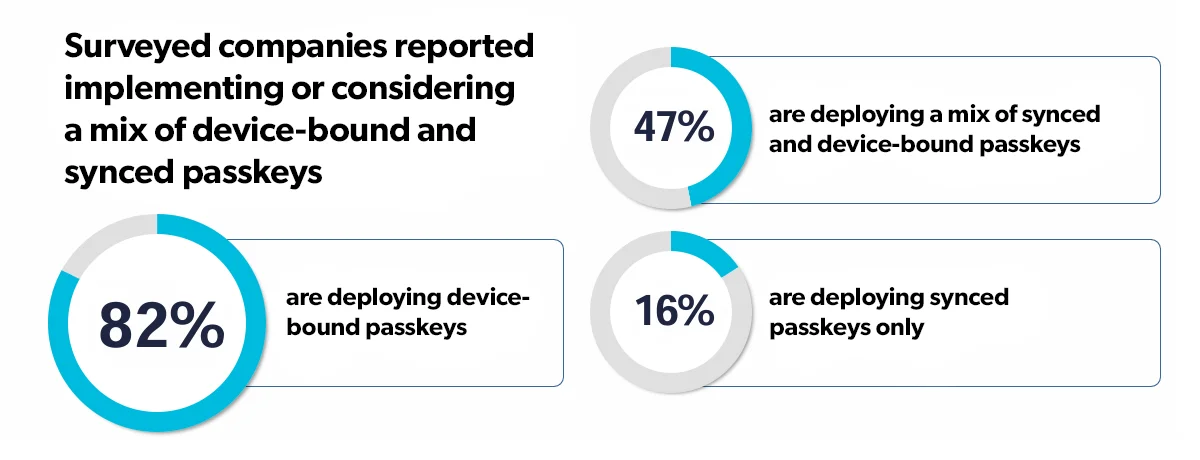
Source: FIDO Alliance Survey "The State of Passkey Deployment in the Enterprise"
Platform vs. Roaming Authenticators
Platform authenticators are built directly into operating systems and devices (think Windows Hello or Touch ID). These authenticators provide friction-free access for various tasks using embedded hardware like the Trusted Platform Module (TPM).
Roaming authenticators differ in that they’re external, portable devices (e.g., physical security keys, smart cards) that connect via USB, NFC, or Bluetooth. These types of authenticators enable users to authenticate securely across multiple untrusted workstations without exposing credentials.
What Are the Benefits of FIDO2 Authentication?
FIDO2 improves identity and access management by providing a highly secure, passwordless framework designed for modern digital environments.
- Stronger security: By replacing “shared secrets” with public-key cryptography, FIDO2 mitigates risks like phishing, credential stuffing, and man-in-the-middle attacks.
- Enhanced privacy: Biometric data used for verification remains strictly on the user’s local device and is never transmitted over the network.
- Frictionless user experience: People can log into accounts in seconds using familiar actions like a fingerprint scan, facial recognition, or a hardware key tap, instead of having to remember or reference a complex password.
- High scalability: FIDO2 easily integrates across major operating systems, browsers, and devices, aiding in organisational roll-out and adoption.
- Reduced access-management overhead: Eliminating passwords drastically reduces helpdesk ticket volumes related to password resets and account lockouts, freeing up IT teams for other security initiatives.
FIDO2 and Biometric Authentication
Biometrics are key to FIDO2 authentication and fall into two categories: biological and behavioural. Biological data includes fingerprints, facial scans, and voice recordings to name a few, while behavioural data may consist of touchscreen use, typing speed, and mouse activity, among other data points.
While biometrics streamline access, you must account for limitations such as spoofing risks, bias in facial-recognition algorithms, and user privacy concerns.
The Comprehensive Guide on Phishing-Resistant MFA, Passkeys and FIDO Security Keys
FIDO2 combining with PKI authentication offers future-ready solutions for vendors to implement passwordless authentication & safeguard access to cloud-based apps.

How to Implement FIDO2
You can implement FIDO2 authentication across your infrastructure by following these high-level steps:
- Define policies and login experiences: Establish authentication policies based on risk tolerance and determine when it’s more appropriate to allow synced passkeys (convenience) vs. device-bound authenticators (high assurance).
- Set up a FIDO server: Deploy a FIDO2-certified server or use a cloud service to generate challenges, manage public keys, and validate identity signatures.
- Integrate with existing IAM infrastructure: Connect your FIDO server to core identity and access management (IAM) systems and directory services to enforce single sign-on (SSO) and access controls.
- Build registration and sign-in flows: Modify client-side web and mobile applications using WebAuthn to deliver self-service passkey enrolment and login experiences.
FIDO2 Authentication by Industry
Different industries select platform or roaming authenticators based on their unique operational requirements and regulatory environments.
For example, banking depends on platform authenticators (like Touch ID or Face ID on mobile apps) to deliver compliant strong customer authentication.
In aviation, airlines and airport operators equip ground staff and flight crews with roaming authenticators (such as NFC hardware keys) to secure access across shared terminals and workstations.
Factory floors of manufacturing facilities rely on rugged roaming security keys so shift workers can quickly sign in to shared production machinery without relying on personal smartphones or password entry.
And ecommerce retailers make use of platform authenticators to offer one-click checkout experiences that boost conversion rates while preventing account takeover attacks.
Considering FIDO2 Solutions
Passwordless, phishing-resistant authentication is rapidly becoming the standard for modern identity security in enterprises and government agencies alike. As organisations seek to eliminate passwords and strengthen security, FIDO2 is supporting that goal as a globally trusted open standard.
Transitioning to FIDO2 begins with assessing your current identity infrastructure and evaluating authenticator options—from platform passkeys to hardware security keys.
Explore Thales’s FIDO2 authenticators to discover how tailor-made hardware tokens and smart cards help secure your organisation's passwordless deployment.
Related resources
Frequently Asked Questions
FIDO2 authentication can be complex, so here are answers to some common questions about this topic.
What is a passkey?
A passkey is a digital credential created using FIDO standards that allows you to sign in to accounts without a password. Passkeys replace traditional credentials with secure, encrypted key pairs tied directly to your local device or credential manager.
What is a FIDO2 key?
A FIDO2 key (often called a hardware security key) is a physical USB, NFC, or Bluetooth token that securely generates and stores cryptographic private keys on a dedicated hardware chip to authenticate users without relying on static passwords.
Is a passkey the same thing as FIDO2?
No. Though related, passkeys and FIDO2 are distinct concepts. FIDO2 is the underlying technical framework and open standard created by the FIDO Alliance and W3C. A passkey is the individual credential created and used by an end-user within the FIDO2 ecosystem.
Are passkeys considered multi-factor authentication?
Yes. Passkeys inherently satisfy multi-factor authentication requirements in a single step. They combine "something you have" (such as the physical device holding the key) with "something you are" (your biometrics) and/or "something you know" (like a device PIN).
What are examples of FIDO2?
FIDO2 examples include platform authenticators such as Windows Hello, Apple Touch ID/Face ID, and Android biometrics. Other common FIDO2 authenticators include hardware security keys, smart cards, and passkeys synchronized across trusted devices through secure credential managers. Thales offers FIDO-certified authenticators that support passwordless and phishing-resistant authentication.